 Tasks 'n Timers

It's 9am and the day is wide open. Then it's lunch, and you've been busy the whole time: messages, a meeting, a quick fix someone needed. The thing you meant to work on today hasn't been touched.
A work timer is a simple fix for that. Instead of one long, open day, you work in blocks: 25 or 50 minutes on one task, then a break, then the next block. This guide covers why blocks beat an open day, how long a block should be, when to take breaks, and how to use a work timer app on iPhone that knows what each block was for.
Why a work timer helps
An open day fills itself
Work expands so as to fill the time available for its completion.
An eight-hour day with no shape gives every task all eight hours, so the urgent and the easy go first and the important waits. A timer gives one task a boundary: this report gets the next 50 minutes. With an end in sight, it's easier to start and harder to drift.
Busy isn't the same as productive
Cal Newport's Deep Work puts it as a formula:
High-Quality Work Produced = (Time Spent) × (Intensity of Focus)
A day of half-attention can feel full and still produce little. A work timer protects the second half of that formula: for the length of a block, there's one task and nothing else.
Every switch costs you a warm-up
The attention researcher Gloria Mark at UC Irvine has found that after an interruption it takes people around 23 minutes, on average, to get fully back to what they were doing. Checking messages “for a second” isn't a second. A block with one task, and messages saved for the break, keeps you from paying that cost all day.
You can't manage time you don't measure
Until we can manage time, we can manage nothing else.
Most people can't say where yesterday's hours went. A work timer that logs each block answers it: so many minutes on the report, so many on email, and a clear picture of what to change tomorrow.
How long should a work block be?
Three patterns cover most workdays:
| Pattern | Good for | Watch out for |
|---|---|---|
| 25 on, 5 off (the Pomodoro Technique) | Email, admin, tasks you're avoiding, days full of meetings | Being cut off just as deeper work gets going |
| 50 on, 10 off | Writing, coding, design, analysis: work that needs a warm-up | Tired afternoons, when 50 minutes can drag |
| 52 on, 17 off | Long stretches with real rest in between | Fitting it around a meeting-heavy calendar |
If you're not sure, start with 25 minutes for the first block of the day. If you're still going strong as it runs out, add time. Many people settle on 25 for shallow work and 45 or 50 for deep work. There's more on longer, open-ended blocks in our guide to the flow timer.
The Pomodoro Technique for work
The Pomodoro Technique was developed by Francesco Cirillo as a university student in the late 1980s, but it fits office work just as well:
- Choose one task. Not “work”. “Draft the client proposal.”
- Work for 25 minutes. Only on that task. If something else comes up, write it down and come back.
- Take a 5-minute break. Stand up, look away from the screen.
- After four rounds, take a longer break, 15 to 30 minutes.
What changes at work is what gets in the way: messages, meetings and colleagues. A few habits help:
- Plan blocks around your meetings, not over them. A 25-minute gap before a call is one Pomodoro, not wasted time.
- Batch the small stuff. Give email and messages a block of their own instead of letting them leak into every other one.
- Show you're busy. Set your status to busy or turn on Do Not Disturb for the length of a block.
- Use the break for the quick replies. People can usually wait 25 minutes for an answer.
Work break timer: when and how to rest
Breaks are part of the method, not a reward for finishing it. A short rest between blocks is what makes the next block possible, and skipping them tends to catch up with you by mid-afternoon.
- After a 25-minute block, rest about 5 minutes. After 50, about 10. After four short blocks, take a longer one.
- Rest away from the screen. Scrolling your phone isn't a break for your eyes or your attention. Walk, stretch, get water.
- Time the break too, or five minutes becomes twenty.
Want a timer that switches between work and break for you in the browser? Our free Pomodoro timer, 50/10 timer and 52-minute timer run the whole cycle with a chime at each change.
A work timer app for iPhone that knows what you worked on
Most work timers count minutes and forget them. Tasks 'n Timers is a task list with the timer built in, so every block belongs to a task, and at the end of the day you can see where the time went.
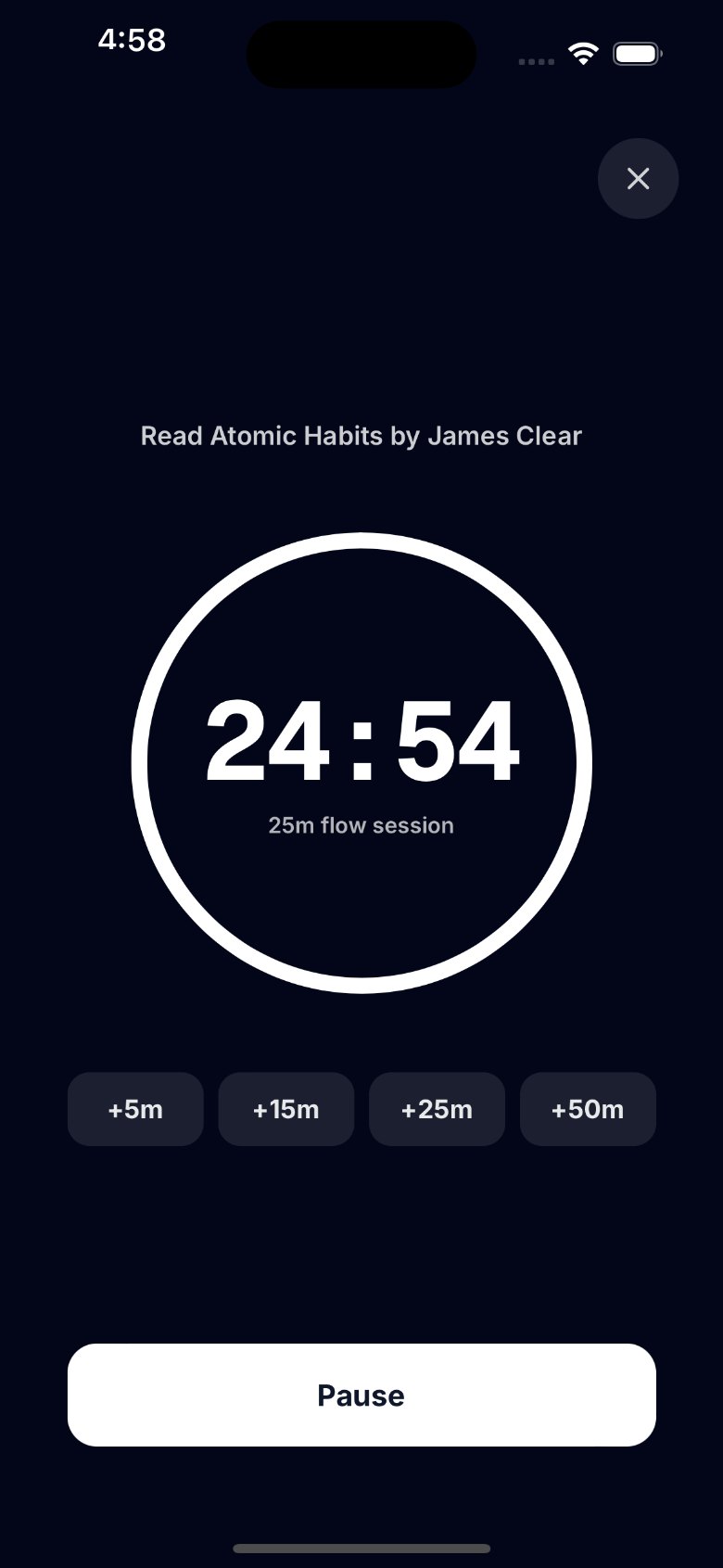
- Start from a task. Tap a task and start a session on it, or start one with no task at all.
- Choose your length. The default is 25 minutes. In Settings you can pick 5, 10, 15, 25, 45 or 50, or choose a length for a single session from the Start button.
- Extend while it runs. Deep in the work? Tap +5, +15, +25 or +50 minutes before it ends. When it reaches zero, the session ends and is logged.
- Plan today. Add the few tasks you'll actually work on to Today, each with a time estimate, so you can see whether the plan fits the hours you have.
- Keeps time when your phone is locked. The timer runs on the clock, not on the app staying open, and with notifications on your iPhone tells you when the session is complete.
- Forgot to start the timer? Log the focus time afterwards with Log focus time, on the task you worked on.
- See where the day went. Stats shows your focus minutes and sessions for today, this week and this month. More on reading them in Pomodoro tracking.
- Works with Google Tasks. Connect Google and your Google Tasks lists sync both ways, so your work list stays the same in Gmail and Calendar. Or keep your lists on your iPhone with no account at all.
One honest difference from some work timers: Tasks 'n Timers doesn't run a break timer for you or block other apps. When a session ends, you decide when to rest and when to start the next block.
How to time your workday: a step-by-step plan
- Look at your calendar. Find the gaps between meetings. Each 30-minute gap is a 25-minute block.
- Pick three tasks for today. The ones that would make the day a good one. Put them in Today.
- Check the estimates. If the three tasks need more time than your gaps add up to, drop one now rather than at 5pm.
- Start the first block on the hardest task. Morning attention is the best you'll get. Phone face down, messages closed.
- Write down interruptions, don't follow them. They'll still be there in the break.
- Rest between blocks. Five minutes after 25, ten after 50.
- Give messages their own block. Once before lunch and once in the afternoon is enough for most jobs.
- Look back before you log off. How many minutes went to the three tasks that mattered? That's tomorrow's plan, improved.
The short version
A work timer turns an open day into a set of blocks, each with one task and an end. Use 25-minute blocks for shallow work and 45 or 50 for deep work, rest between them, and keep messages for their own block. Tasks 'n Timers is a work timer app for iPhone that starts from your task list and remembers every block.