 Tasks 'n Timers

You know exactly what you need to do. You've known all morning. You opened the document, checked one message, looked something up, and now it's 2pm and the document is still blank. Not because you don't care, but because starting feels like pushing a car uphill.
The Pomodoro technique for ADHD is one of the most common tips people swap for this, and for good reason: it turns “do the whole thing” into “do 25 minutes”, with a timer that makes the time visible. But the classic version wasn't designed for an ADHD brain, and followed to the letter it can backfire. This guide covers why the method helps, where it goes wrong, how to adapt it, and how to use a timer on iPhone that starts from the one task you picked.
Why the Pomodoro technique helps with ADHD
A note first: this is a guide to a productivity method, not medical advice. If ADHD is affecting your work or life, a doctor or ADHD coach can help you find what works for you.
Starting is the hardest part
ADHD is not a disorder of knowing what to do, it is a disorder of doing what you know.
Big, vague tasks (“write the report”) give your brain nothing to grab. A Pomodoro shrinks the ask to something you can say yes to: one task, a short block, and permission to stop when the timer ends. Once you've started, keeping going is often easier than you expected.
Time you can see is time you can feel
Many people with ADHD describe time blindness: an hour and ten minutes feel the same until the deadline is suddenly here. A countdown makes time concrete. You can see how much of the block is left, and the end is always in sight. That's why “visual timer” is one of the most searched ADHD tools: a ring or a disc that empties as time passes says more at a glance than numbers do.
One task at a time, by design
The method has one rule that matters more than the 25 minutes: one task per block. Everything else that pops into your head goes on a list for later. For a mind that jumps between five open threads, a block with a single named task is a simple fence.
Breaks are built in, not earned
Hyperfocus is the other side of ADHD: hours vanish into one thing, and you surface hungry, stiff and late for something. Timed breaks interrupt that before it costs you the rest of the day.
Where the classic Pomodoro goes wrong for ADHD
The standard recipe is 25 minutes of work, a 5-minute break, and a longer break after four rounds. Three things tend to trip people up:
- 25 minutes can be too long to start. On a hard day, even 25 minutes feels like a wall. If you can't start, the block is too big.
- The bell can break real focus. If you finally got going at minute 20, a timer that stops you at 25 throws away the hardest part.
- Five-minute breaks become forty. “Just one video” is how a break turns into the rest of the afternoon.
None of this means the method doesn't work for you. It means the numbers are a starting point, not a rule.
How to adapt the Pomodoro technique for ADHD
Make the first block tiny
Start with 5, 10 or 15 minutes. The goal of the first block isn't to finish, it's to start. Once you're moving, the next block can be longer.
Extend when it's going well
If the timer is about to end and you're in the zone, don't stop. Add time while it's still running. This is the idea behind a flow timer: start short like a Pomodoro, keep going while it flows.
Use a timer you can see
Pick a timer with a visual countdown, a ring or bar that shrinks, and keep it in sight. Our free browser timers, like the 25-minute timer and the Pomodoro timer, show a ring that empties as the time runs down, with a full-screen view.
Name the task before you start
“Work on the report” is too vague. “Write the first paragraph of the summary” is a task. If you can't name it in a few words, break it down first.
Park distractions, don't follow them
Keep a list next to you. When a thought or a “quick” errand pops up, write it down and go back. It'll still be there in the break.
Time the break as well
Set a timer for the break too, and decide before the break what you'll do in it: water, a stretch, a walk to the window. Avoid starting anything with no natural end.
Look back at what you did
ADHD can make a productive day feel like a wasted one. A record of the blocks you finished, task by task, is proof you did more than you think, and it shows which kinds of tasks you actually got done.
An ADHD timer on iPhone that starts from your task list
Most timers count minutes and know nothing about what you meant to work on. Tasks 'n Timers is a task list with the timer built in, so every block starts from one task you picked.
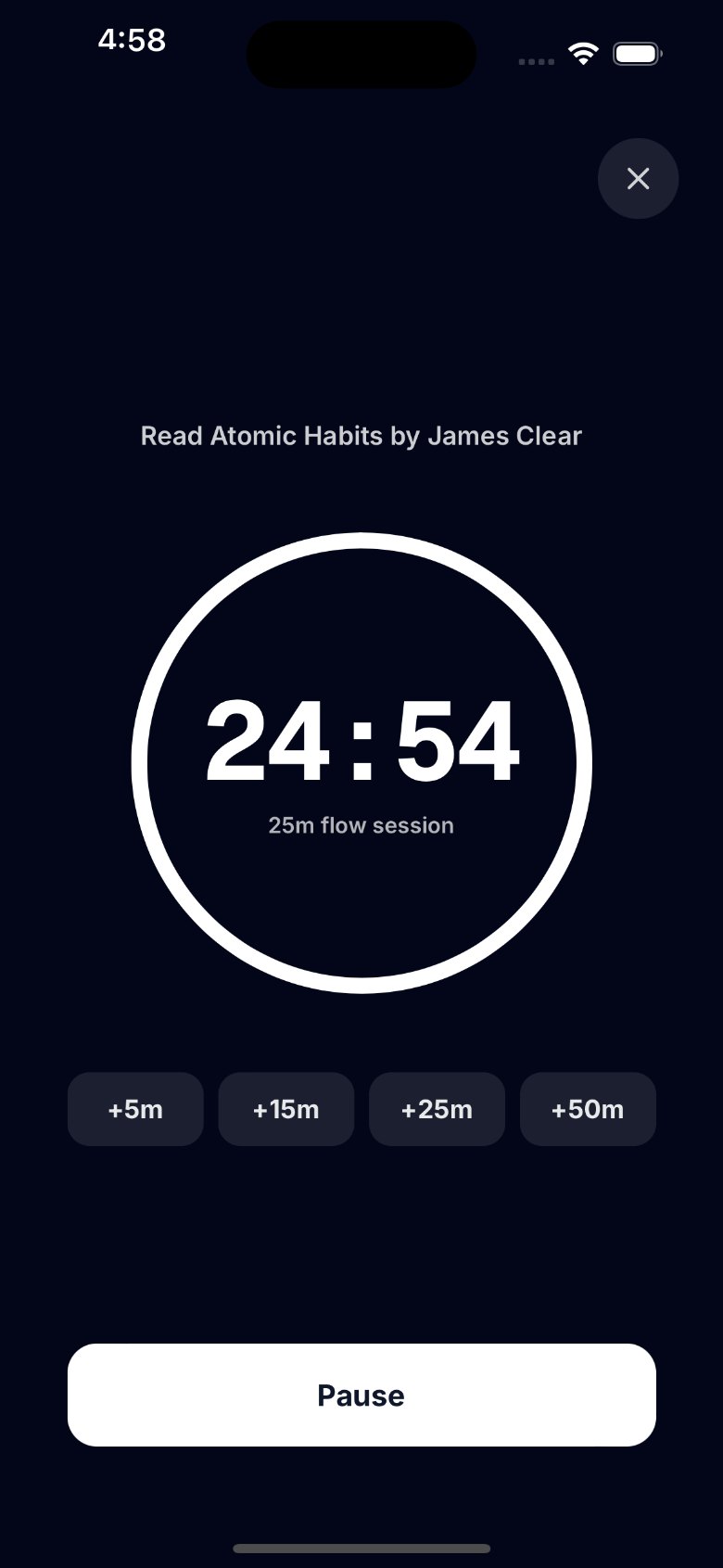
- One task, then the timer. Tap a task and start a session on it. You can also start one with no task, for the days when picking one is the hard part.
- A ring you can see. The countdown is a ring that empties as the session runs, so you can tell at a glance how much is left.
- Short blocks are fine. In Settings, pick a default of 5, 10, 15, 25, 45 or 50 minutes, or choose a length for a single session from the Start button.
- Extend while it runs. In the zone? Tap +5, +15, +25 or +50 minutes before the session ends. When it reaches zero, the session ends and is logged.
- Zen mode. A full-screen view with only the task, the ring and the extend and pause buttons. Your lists and stats stay hidden until the session ends.
- Plan a small Today. Add the two or three tasks you'll actually work on to Today, each with a time estimate, so you can see whether the plan fits the day.
- Forgot to start the timer? It happens. Log the focus time afterwards with Log focus time, on the task you worked on.
- See what you got done. Stats shows your focus minutes and sessions for today, this week and this month. More on reading them in Pomodoro tracking.
- Works with Google Tasks, synced both ways, or with lists on your iPhone and no account at all.
One honest difference from some ADHD apps: Tasks 'n Timers doesn't run a break timer for you or block other apps. When a session ends, you decide when to rest and when to start the next one. For the break, our free Pomodoro timer in the browser times work and break for you.
How to start: a Pomodoro plan for an ADHD day
- Pick two or three tasks for today. Not ten. Put them in Today.
- Break the first one down until the first step takes 15 minutes or less.
- Clear the space. Phone face down or in another room, one window open, headphones on if they help.
- Start a short block. 10 or 15 minutes on that first step. The only goal is to start.
- Write down every distraction instead of following it.
- Extend if it's flowing. If not, let the block end. Either way, it counts.
- Take a timed break, with something planned for it.
- Next block, a bit longer if the last one felt easy. Shorter if it didn't.
- Look back at the end of the day. Count the blocks you finished, not the ones you missed.
The short version
The Pomodoro technique works for ADHD when you bend it: start with blocks small enough to say yes to, use a timer you can see, keep one task per block, extend when you're in flow, and time your breaks so they end. Tasks 'n Timers is a focus timer for iPhone that starts every block from a task in your list and remembers what you got done.