 Tasks 'n Timers

You sit down to write one email. Twenty minutes later you've read three others, checked the news, and the email is still a blank draft. Nothing went wrong, exactly. Nothing told you to stay.
A focus timer is that something. It's a countdown that marks out a block of time for one task, so that for the next 25 or 50 minutes the question “what should I be doing?” already has an answer. This guide covers why that works, how long to focus for, how to protect a session once it starts, and how to use a focus timer app on iPhone.
Why a focus timer works
Focus is a choice you make once, not a hundred times
Without a timer, every notification is a small decision: look now, or later? Each one is easy to lose. A timer moves the decision to the start. You choose the task once, start the clock, and every later distraction meets an answer you've already given.
People think focus means saying yes to the thing you've got to focus on. But that's not what it means at all. It means saying no to the hundred other good ideas that there are.
An end makes the start easier
“Work on the report” has no edge, so it's easy to put off. “Work on the report until the timer ends” does. Knowing the session will end, and that you're allowed to stop when it does, takes most of the dread out of starting.
Attention compounds
The first few minutes on any task are spent loading it into your head. Every switch throws that away and you pay again. A focus session keeps you on one thing long enough for that warm-up to pay off.
Concentrate all your thoughts upon the work at hand. The sun's rays do not burn until brought to a focus.
How long should a focus session be?
There's no single right answer, but three lengths cover most people:
| Length | Good for | Watch out for |
|---|---|---|
| 25 minutes (a Pomodoro) | Starting the day, dull tasks, getting unstuck | Being cut off just as the work gets going |
| 45 to 50 minutes | Writing, coding, studying, anything that needs a warm-up | Fading in the last ten minutes on tired days |
| Start short, extend | Days when you don't know how deep you'll get | Forgetting to rest after a long run |
The classic Pomodoro focus timer is 25 minutes of work and a 5-minute break. It's a good default, and it's the best length for tasks you're avoiding, because 25 minutes is easy to agree to. For deep work, many people find 25 minutes too short and settle on 45 or 50.
The third option is the one most timers skip: start a short session, and if you're in the zone when it's running out, add time instead of stopping. That's the idea behind a flow timer.
How to protect a focus session
A timer can't stop you from picking up your phone. These habits help it work:
- Name the task before you start. “Draft the intro”, not “work”. A vague task invites switching.
- Turn the phone face down, or put it out of reach. Let the timer's alert be the only thing you listen for.
- Keep a scrap of paper. When something pops into your head, write it down and go back. You'll deal with it after the session.
- Close what you don't need. One window, one tab, one document.
- Rest when it ends. Stand up, look away from screens. The break is what makes the next session possible.
Use a focus timer to beat procrastination: the Swiss cheese round
Some tasks we don't avoid because they're hard. We avoid them because we've built up a feeling about them: the tax form, the awkward email, the project that went wrong last time. The longer they wait, the heavier they feel, and “just sit down and do it” stops working.
In How to Get Control of Your Time and Your Life (1973), time-management writer Alan Lakein called his answer the Swiss cheese method. Don't try to swallow an overwhelming task whole. Poke small holes in it instead: a few minutes here, one small piece there. Each hole is easy. Make enough of them and the task is so full of holes that what's left falls apart.
The Swiss cheese method, in short: poke a small hole in a big task you've been putting off. One hole is easy. After enough of them, there's barely any cheese left.
A focus timer turns that into a game you can play in an hour:
- Pick two or three tasks you've been putting off. The ones you feel a small knot about.
- Give yourself one hour. Three tasks get 20 minutes each; two tasks get two rounds of 15 minutes each.
- Work on the first task until the timer ends, then switch. Even if you're mid-sentence. The rule is time, not progress.
- Go round in a circle until the hour is up.
- Count your holes. You don't score points for finishing. You score them for showing up: every session you put in is a hole in the cheese.
Why it works: you aren't agreeing to do the dreaded task, only to spend 20 minutes near it, and 20 minutes is easy to agree to. Switching on a timer keeps any one task from swallowing the hour, and coming back to it in the next round is much easier than starting it was. Most tasks turn out to be nothing more than time spent on them. Once you've put in a few sessions, the feeling around it is usually gone too.
Focus app for iPhone, or the iPhone's own Focus?
Search for a focus app on iPhone and you'll find two different things.
- The iPhone's Focus modes (Do Not Disturb, Work, Sleep and your own) are built into iOS. They decide which notifications and people can reach you. They don't time a session, and they don't know what you're working on.
- A focus app gives the time a shape: a countdown for one task, and a record of what you did. Some also block other apps; others, like a focus timer, only keep you on the task.
They work best together. Turn on a Focus mode to quiet the phone, then start a session in a focus timer so the next 25 or 50 minutes has one job.
What to check in a focus app for iPhone:
- Does it start from your to-do list, or is it a timer with nothing around it?
- Can you extend a session while it runs, so a good stretch isn't cut off?
- Does it keep time when the phone is locked, and tell you when the session ends?
- Does it record your focus time, per task and per day?
- Does it block apps, and do you want that? Some people need a lock. Others just need a clock.
A focus app for iPhone that starts from your tasks
Most focus apps are a timer with nothing around it. Tasks 'n Timers is a to-do list with the focus timer built in, so the timer always knows what you're working on.
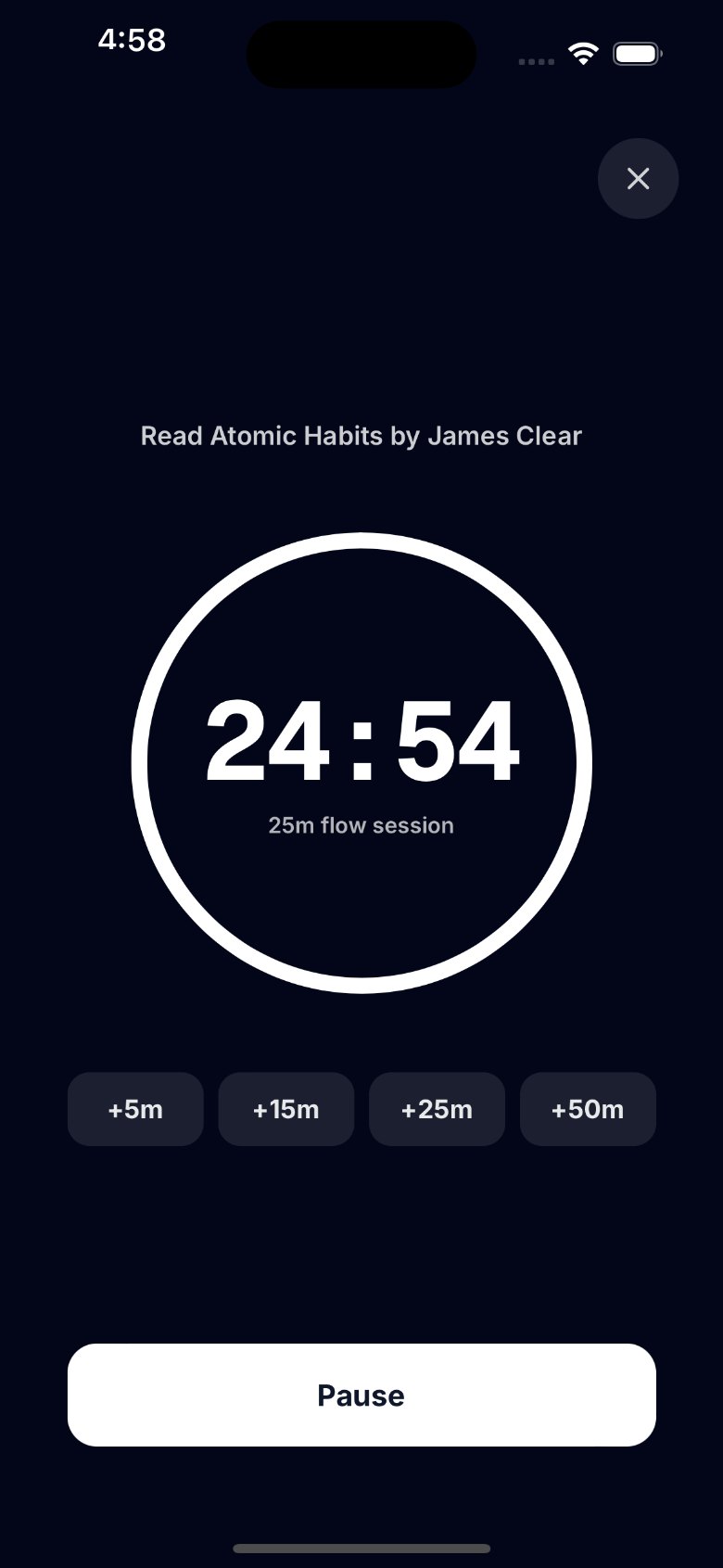
- Start from a task. Tap a task and start a focus session on it, or start one with no task at all.
- Choose your length. The default is 25 minutes. In Settings you can pick 5, 10, 15, 25, 45 or 50, or choose a length for a single session from the Start button.
- Extend while it runs. In the zone? Tap +5, +15, +25 or +50 minutes while the session is running. When it reaches zero, the session ends and is logged.
- Pause, or go full screen. Pause if you're interrupted. Zen mode fills the screen with the task you're on, the time left, and the extend and pause buttons.
- Keeps time when your phone is locked. The timer runs on the clock, not on the app staying open, and, with notifications on, your iPhone tells you when the session is complete.
- See your focus time. Every session is saved to its task. Stats shows your focus minutes and sessions for today, this week and this month, with a heatmap of the last four months. More on that in Pomodoro tracking.
- Works with Google Tasks. Connect Google and your Google Tasks lists sync both ways. Or keep your lists on your iPhone with no account at all.
For a Swiss cheese round, start a 15-minute session on the first task from the Start button, tap +5 while it runs to make it 20, then start the next task when it ends. Each session is logged to its task, so you can watch the holes add up in today's sessions and in Stats.
One honest difference from some focus apps: Tasks 'n Timers doesn't block other apps or run a break timer for you. It keeps you on one task and keeps the record; when a session ends, you decide when to rest and when to start the next one. If you want an app that locks you out of your phone, see how Forest compares.
How to use a focus timer: your first day
- Pick three tasks for today. Not ten. Three you'd be glad to finish.
- Choose a length. 25 minutes if you're starting cold, 45 or 50 if the work needs a warm-up.
- Start from the first task. Tap it and start the session. Phone face down.
- Write down distractions, don't follow them. Paper, not another app.
- Extend or stop on purpose. If you're flowing near the end, add time. If not, let it finish.
- Rest five to ten minutes. Away from the screen.
- Look back in the evening. Open Stats. How many focus minutes did you get, and did they go to the task that mattered most?
The short version
A focus timer works because it turns “what should I do now?” into a decision you make once. Pick one task, choose 25 or 50 minutes, put the phone away, and extend when the work is going well. Tasks 'n Timers is a focus timer app for iPhone that starts from your to-do list and remembers every session.