 Tasks 'n Timers

It's minute 23. The paragraph that wouldn't come all morning is finally coming. You can feel the next three sentences lining up.
Ding. Pomodoro over. Time for a break.
If you've used the Pomodoro Technique for real work, writing, coding, studying, design, you've probably had this moment. The method that got you started is now the thing stopping you. A flow timer fixes exactly that: it starts a session like a Pomodoro, then lets you keep going when the work is going well. To see why that matters, it helps to understand what Pomodoro is good at, and what it isn't.
Why focus is worth protecting at all
The best work happens in flow
The psychologist Mihaly Csikszentmihalyi spent decades studying when people feel most engaged. He called that state flow, and described it this way:
The best moments usually occur when a person's body or mind is stretched to its limits in a voluntary effort to accomplish something difficult and worthwhile.
In flow, time distorts, self-consciousness drops away, and hard work feels almost effortless. It's also fragile. Flow takes a while to reach, and a single interruption can end it.
Depth beats hours
Cal Newport's Deep Work makes the professional case:
To produce at your peak level you need to work for extended periods with full concentration on a single task free from distraction.
Note the words extended periods. Newport isn't arguing for more hours. He's arguing that unbroken concentration produces work that scattered effort can't.
Starting is the hardest part
There's a catch. Flow is wonderful once you're in it, but getting there means sitting down and starting, and starting is where most of us lose. That's the problem the Pomodoro Technique was invented to solve.
What Pomodoro gets right
Francesco Cirillo created the Pomodoro Technique as a university student in the late 1980s, using a tomato-shaped kitchen timer to study in short, fixed bursts. (New to it? Here is the Pomodoro technique for studying, step by step.) The classic version is 25 minutes of work, then a short break, with a longer break every four rounds.
Its genius is psychological:
- It makes starting cheap. “Work on the report all afternoon” is daunting. “Work on it for 25 minutes” is easy to say yes to.
- It puts a fence around the task. C. Northcote Parkinson observed that “work expands so as to fill the time available for its completion.” A fixed block stops a small task from swallowing the day.
- It forces rest. Regular breaks keep long days from becoming a grind.
For admin, email, chores and anything you've been avoiding, a fixed Pomodoro is hard to beat.
Why people look for a Pomodoro alternative
The fixed bell treats every minute the same. But the first ten minutes of deep work are warm-up, and the best ones often come after twenty. A timer that always stops at 25 cuts you off at the exact point the investment starts paying back.
Many people quietly “cheat”: they silence the bell and keep going, then feel they've broken the method. Others obey it, take the break, and spend the next session trying to get back to where they were.
Other focus apps answer a different problem: Forest, for example, makes a tree die if you leave your phone. If you're weighing the two, here is Forest vs Tasks 'n Timers. New to timers altogether? Start with what to look for in a Pomodoro timer app. Or read how to use a focus timer, and how long a session should be.
What a flow timer does differently
A flow timer keeps the cheap start and drops the forced stop.
- You pick a starting length, short enough to say yes to.
- Before it ends, you choose: let it finish and rest, or extend it and keep going.
- Your time is still recorded, so long sessions don't turn into a blur.
It's the best of both: Pomodoro's low-friction beginning, and room for flow when it arrives.
The Flowtime technique, step by step
The Flowtime technique goes one step further than a flow timer: there's no set length at all. It was described by Zoë Read-Bivens in a Medium post, as a fix for the Pomodoro bell that interrupts good work. Instead of a countdown, you watch the clock and let your focus decide.
- Pick one task. Write it down.
- Note the start time and begin.
- Work until your focus fades. Not until a bell: until you notice you're tired, restless or reaching for your phone.
- Note the stop time, and any interruptions along the way.
- Rest in proportion to the work. A longer stretch earns a longer break.
- Repeat, and over a week your log shows how long you really focus.
How long should a Flowtime break be?
Read-Bivens suggests sizing the break to the session, roughly like this (as summarised by Zapier):
| You worked | Take a break of |
|---|---|
| 25 minutes or less | 5 minutes |
| 25–50 minutes | 8 minutes |
| 50–90 minutes | 10 minutes |
| More than 90 minutes | 15 minutes |
Treat the numbers as a starting point. The point of Flowtime is that you notice when you need rest, rather than obeying a schedule.
Flowmodoro: the one-fifth break rule
Flowmodoro is the name the internet gave to a simpler version of the same idea, a cross of flow and Pomodoro. It has no single founding text; it spread through YouTube videos and study communities. The rule fits on a sticky note:
- Work until your focus fades.
- Take a break of one fifth of the time you worked.
Fifty minutes of work earns a ten-minute break. Twenty-five minutes earns five, which is exactly the classic Pomodoro break. A long 90-minute stretch earns eighteen. Some people use a more generous divisor, a third instead of a fifth; pick the one that leaves you fresh for the next round.
The appeal of Flowmodoro is that breaks scale on their own. You never have to decide whether you've “earned” a long break: the work you did decides.
Flow timer vs Flowtime vs Flowmodoro
| Pomodoro | Flow timer | Flowtime technique | Flowmodoro | |
|---|---|---|---|---|
| Session length | Fixed, usually 25 min | A starting length you can extend | None: work until focus fades | None: work until focus fades |
| What ends a session | The bell | You, or the countdown if you don't extend | You | You |
| Break | Fixed, 5 min (longer every 4th) | Up to you | Sized to the session (5–15 min) | One fifth of the work time |
| Best for | Starting, shallow tasks | Deep work that's hard to start | People who find any countdown distracting | People who want a simple break rule |
The flow timer is the middle ground. A countdown makes starting easy and gives you a natural moment to check in, and you can keep extending the session for as long as the work is flowing. If you love the Flowtime idea but drift without any clock at all, a flow timer is a good way in.
James Clear sums up why this matters in Atomic Habits:
You do not rise to the level of your goals. You fall to the level of your systems.
A system that fights you when work is going well isn't a good system. One that bends to your focus is.
Which one should you use?
| Your work | Better fit | Starting length |
|---|---|---|
| Email, admin, small tasks | Pomodoro, fixed blocks | 15–25 min |
| A task you keep putting off | Pomodoro, a tiny first block | 5–15 min |
| Writing, coding, design | Flow, extend while it's going well | 25–50 min |
| Studying a hard topic | Flow, with a distraction-free screen | 25–50 min |
You don't have to pick one forever. The most useful pattern is a hybrid: start small like a Pomodoro, then extend like a flow timer once you're absorbed.
What to look for in a flow timer app
Plenty of timers count down. Fewer of them are good flow timers. Before you pick one, check five things:
- Can you extend without stopping? Adding time should take one tap while the session runs, not a reset and a new session.
- Does it log the minutes you really worked? If you stop early or run long, the record should show what happened, not the length you picked.
- Does it know what you worked on? A session tied to a task tells you where your week went. A bare total doesn't.
- Does it keep time when the phone is locked? You shouldn't have to keep the app open for the countdown to stay right.
- Does it leave breaks to you? The whole point is that the bell doesn't decide. A timer that forces a break brings the Pomodoro problem back.
How Tasks 'n Timers works as a flow timer
Tasks 'n Timers was designed around that hybrid.
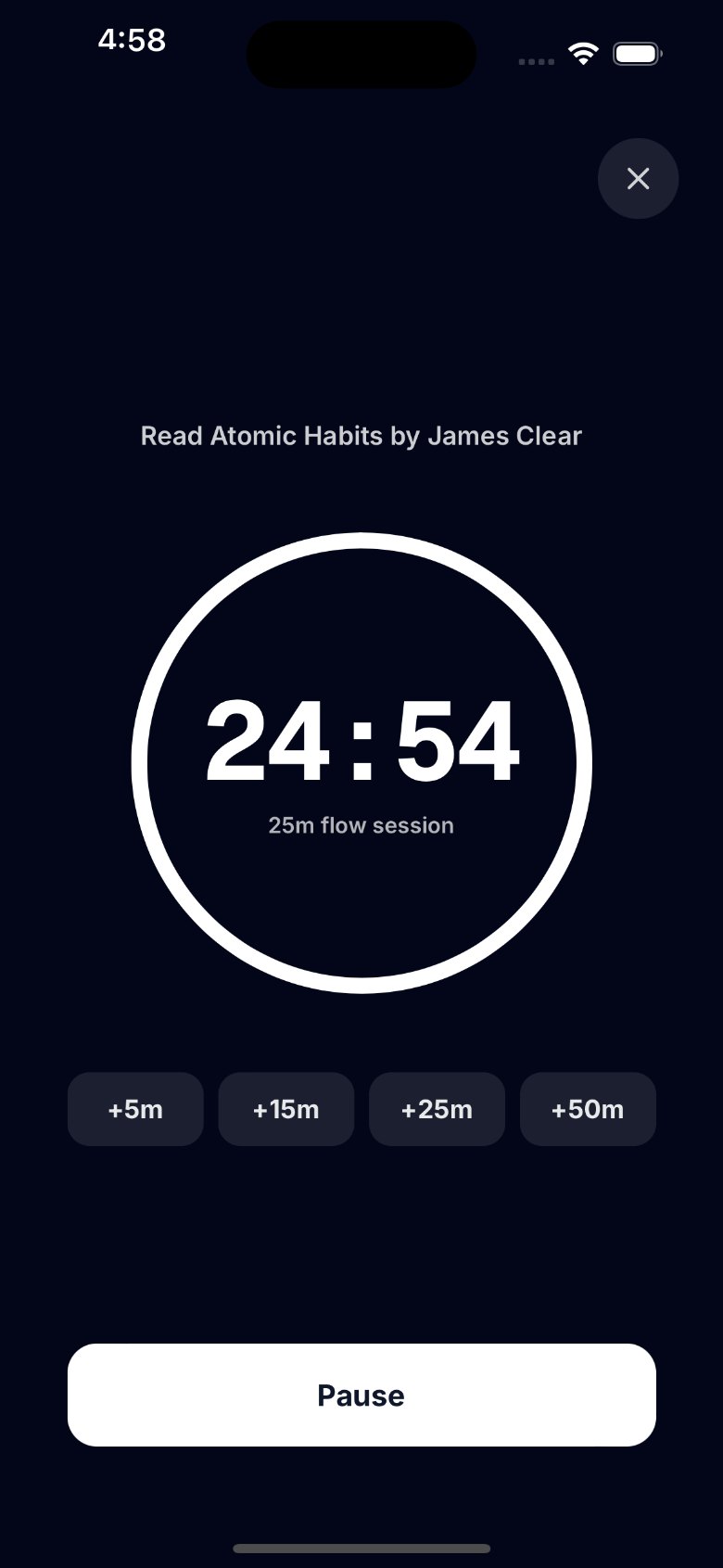
- Start small. Choose 5, 10, 15, 25, 45 or 50 minutes in Settings, or a length for one session from the Start button.
- Extend with one tap. In the zone as the countdown runs low? Add +5, +15, +25 or +50 minutes without stopping.
- No forced breaks. You decide when to stop.
- Zen mode. A calm full-screen countdown with just your task and the extend and pause buttons, so there's nothing to pull you out.
- Tied to your tasks. Start a session from a task on your list, local or from Google Tasks, and your history says what you worked on, not just how long.
- Honest stats. Minutes you actually focused, for today, this week and this month, with a heatmap of every session. Here is how to use them for Pomodoro tracking.
How to use a flow timer for deep work
- Get the app. Download Tasks 'n Timers on the App Store.
- Pick one task. From a local list or from Google Tasks. One task, not three.
- Choose a start you can't refuse. 15 minutes if you've been avoiding it, 25 or 50 if you're ready to dig in.
- Let Zen take over. Zen mode opens on its own when the session starts. Keep the phone where you can glance at the countdown.
- Before the countdown reaches zero, check in with yourself. Still in it? Tap +5 to +50 to keep going. Fading? Let it finish and take a real break. Once it hits zero the session is logged, and the next one is a fresh start.
- Review your week. Your stats show when your longest sessions happen. Protect those hours for your hardest work.
Using Tasks 'n Timers for Flowtime or Flowmodoro
Tasks 'n Timers counts down rather than up, but it works well for both methods:
- Start a long session, 50 minutes, so the countdown isn't what stops you.
- Extend while you're in it. If the countdown runs low and you're still going, add +5 to +50 minutes.
- Tap Done when your focus fades. The session is logged with the minutes you actually worked, not the length you picked.
- Work out your break. Divide the minutes by five for Flowmodoro, or use the table above for Flowtime. The app doesn't time breaks, so step away from the screen and come back when it's up.
- Read your log. Your session history and stats show how long your real focus stretches are, which is the record the Flowtime technique asks you to keep.
The short version
Pomodoro is the best way to start. A flow timer is the best way to keep going. You don't have to choose: begin with a short session, and when the work starts flowing, give yourself permission to stay.