 Tasks 'n Timers

You sit down to study at 7pm. By 7:40 you've reorganised your notes, refilled your water, and read the same paragraph three times. The exam is in two weeks and nothing has gone in.
The problem usually isn't that you can't learn it. It's that “study chemistry” has no start and no end, so it's easy to put off and easy to drift in. The Pomodoro technique for studying fixes exactly that: it turns a vague evening into a series of short, named sessions that you can begin without a fight.
This guide covers where the method comes from, how to run it step by step, how long to study and rest, and what to do when 25 minutes isn't the right length.
Where the Pomodoro study method comes from
Francesco Cirillo developed the technique as a university student in the late 1980s. He was struggling to concentrate, so he grabbed a tomato-shaped kitchen timer (pomodoro is Italian for tomato) and made a deal with himself: just 25 minutes of real work, then a rest. So the Pomodoro study method was a student's trick before it was a productivity trend.
The classic rhythm is:
- 25 minutes of focused work, one session (a “pomodoro”)
- 5 minutes of rest
- After four sessions, a longer break of 15 to 30 minutes
Why it works for studying
It makes starting cheap
“Study for the evening” is daunting. “Study for 25 minutes” is easy to say yes to. Most of the battle in studying is the first five minutes, and a short, fixed session lowers that bar.
It puts a fence around the work
C. Northcote Parkinson's famous line from his 1955 essay in The Economist:
Work expands so as to fill the time available for its completion.
Give a chapter all evening and it will take all evening. Give it two sessions and you'll find a way to cover it.
It protects your attention
Studying needs sustained concentration on one thing. Cal Newport, in Deep Work:
To produce at your peak level you need to work for extended periods with full concentration on a single task free from distraction.
A session with the phone face-down and one topic in front of you is a small, repeatable version of that.
It builds in rest
Learning isn't only what happens while you read. Short breaks let you stand up, move and reset, so the fourth hour is less of a grind than it would be with no breaks at all.
How to use the Pomodoro technique for studying, step by step
- Decide what you're studying before you start. Not “maths”, but “past paper, questions 1 to 5”. A session needs one clear target.
- Start the timer. 25 minutes is the classic length. If you've been avoiding the subject, start with 15, or even 5.
- Study one thing only. Phone away, other tabs closed. If something pops into your head (“email my tutor”), jot it down and go back.
- Stop when the timer ends. Even if you're mid-sentence, make a one-line note of where you are, so the next session starts instantly.
- Rest properly for 5 minutes. Stand up, stretch, drink some water, look out of a window. Don't open social media: it's the one break that doesn't feel like one.
- After four sessions, take a longer break. Fifteen to thirty minutes, away from your desk.
- Review at the end of the day. What did you cover? What took longer than you thought?
How long should a study session be?
25 minutes is a starting point, not a rule. Some topics need longer to get into:
| What you're doing | Session length |
|---|---|
| Starting something you've been avoiding | 5 to 15 minutes |
| Reading, flashcards, summarising notes | 25 minutes |
| Problem sets, essay writing, a hard topic | 50 minutes |
Hard material often takes ten minutes just to warm up, which is why a rigid bell at 25 can cut you off right as it starts to click. If that happens to you, read about the flow timer, a Pomodoro variation that lets you keep going. The same guide explains Flowmodoro, where you study until your focus fades and then rest for a fifth of that time.
Common mistakes with the Pomodoro study method
- Studying with no clear target. A timer measures time, not progress. Decide what the session is for.
- Skipping breaks. The rest is part of the method, not a reward you've earned.
- Treating every interruption as free. If you check your phone mid-session, the session didn't count. Start the next one properly.
- Planning too much. We nearly always overestimate what fits in an evening. Douglas Hofstadter put it this way:
Plan fewer sessions than feels right, and then do them.It always takes longer than you expect, even when you take into account Hofstadter's Law.
Turn your subjects into lists and your chapters into small topics
A timer works best when you already know what the next session is for. The easiest way to do that is to set your study up as lists before you start.
- Make one list per subject. Biology, Maths, History: each subject gets its own list. If you use Google Tasks, each list is a Google Tasks list, and it syncs both ways.
- Break each chapter into small chunks. Don't add “Chapter 4”. Add “Chapter 4: cell division”, “Chapter 4: practice questions 1 to 10”, “Chapter 4: summarise in your own words”. Aim for chunks that fit in one or two sessions.
- Add them to the list. Each chunk becomes a task, with its own time estimate.
- Pick tonight's chunks. Add the few you'll cover to Today, then tap play on the first.
Small chunks do two things. They make starting easy, because “cell division” is a clear target and “Chapter 4” is not. And they give you something to tick off after every session, which is a small win that keeps you going.
Each list also shows how much time you've focused against the time you planned for its open tasks, with a progress bar. So you can see at a glance that Biology is nearly done while History has barely been touched, and decide where tonight's sessions should go.
Build the consistency habit with the heatmap
The hardest part of studying isn't one good evening. It's the fortieth. Exams are won by the student who studies a little almost every day, not the one who crams for ten hours once.
James Clear puts it well:
You do not rise to the level of your goals. You fall to the level of your systems.
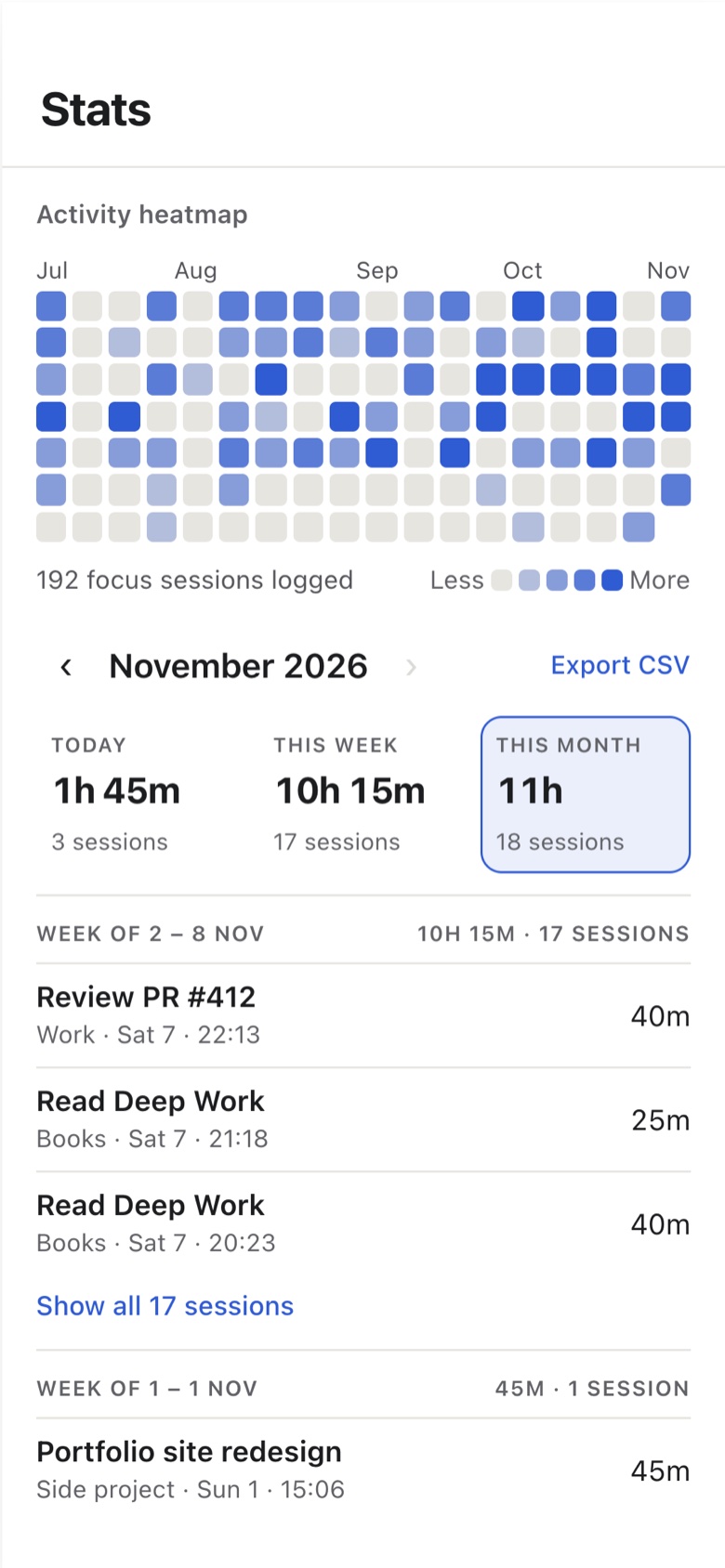
The heatmap in Tasks 'n Timers is a simple system for this. Every day you complete a session, that day's square on the calendar fills in, and the more sessions you complete, the darker it gets. It covers the last four months, so after a few weeks you can see your pattern: the streaks, and the gaps.
Two ways to use it:
- Set a floor, not a target. Decide that you'll complete at least one session a day, even on bad days. One 15-minute session is enough to colour the square and keep the chain going.
- Don't break the chain twice. Missing one day is normal. Missing two in a row is how a habit quietly ends. If you skip a day, make the next day's square the priority.
To see how long each chunk really takes against your estimate, read our guide to Pomodoro tracking. The challenge is keeping it up when the novelty wears off. Small chunks and a short first session help, and the heatmap makes your progress visible when it otherwise isn't.
A study timer on iPhone: Tasks 'n Timers
Wondering how it compares with Forest, the tree-growing study app? Read Forest vs Tasks 'n Timers.
Most timers just count down and forget. Tasks 'n Timers is a study timer built around your to-do list, so each session is tied to a real thing you're studying.
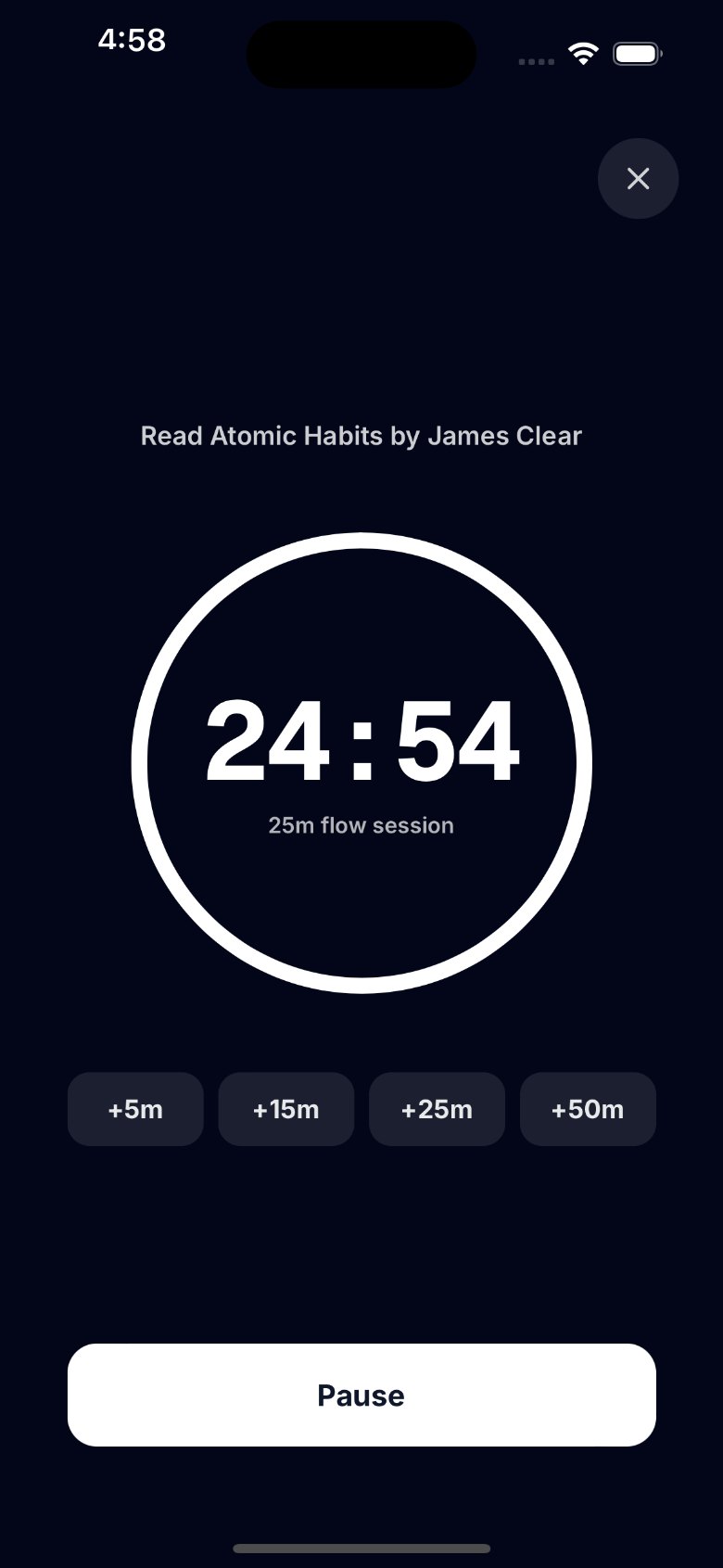
- Start a session from a topic. Add “Chapter 4 questions” as a task and tap play on it. Your history then shows what you studied, not just how long. (You can also run a session with no task at all.)
- Pick 5, 15, 25 or 50 minutes. Match the length to the subject, as in the table above.
- Extend if it's clicking. While a session runs, tap +5, +15, +25 or +50 minutes to keep going instead of being cut off. Once it reaches zero, the session ends and is logged.
- Zen mode. A calm full-screen countdown with your task and the extend and pause buttons, so there's nothing else to look at.
- Plan the day with Today. Pull the three or four topics you'll cover into Today, and give each a time estimate.
- Honest stats. See the minutes you actually focused today, this week and this month, with a heatmap of your sessions each day: proof that you're putting the hours in.
- A list per subject. Each subject is a list, and each list shows the time you've focused against the time you planned. If you use Google Tasks, your lists sync both ways. No Google account? Local lists work fine.
Tasks 'n Timers doesn't run a break timer for you: when a session ends, you decide when to rest and when to start the next one.
Your history stays on your iPhone and, if you connect Google, in a private app folder in your own Google Drive. There's no separate account and no servers of ours.
A simple Pomodoro study plan for tonight
- Download Tasks 'n Timers, make a list for your subject, and add three small chunks of a chapter as tasks.
- Add them to Today.
- Start a 25-minute session on the first topic. Put your phone in Zen mode, face up.
- Rest for 5 minutes when it ends. Away from the screen.
- Repeat for the next topic. After four sessions, take a proper break.
- Open your stats and see what you did, and check the heatmap to keep the streak going.
The short version
The Pomodoro technique for studying works because it makes starting easy, puts a limit on the work, and builds in rest. Choose one topic, set a timer, and study until it ends. Tune the length to the subject, and keep your breaks real.